2024
Monobank
Mobile App

Background
Monobank is one of Ukraine's leading digital banks, known for its mobile-first approach and focus on simplifying everyday financial services. Its app also lets customers buy and manage eSIMs. This project was an external UX engagement with a real Monobank stakeholder, done as part of a UX design program, focused on improving the eSIM experience across the full journey — from discovering and buying an eSIM to managing it after activation.
Core problem
The existing eSIM experience covered the basics, but users struggled to understand and manage it with confidence. Research found friction across the entire journey: discovering the service, understanding the purchase process, managing multiple numbers and payments, and transferring an eSIM between devices.
Before digging into specific problems, the research also checked whether this was worth solving at all: 80% of everyone surveyed — both eSIM users and non-users — said they'd be comfortable managing their mobile number from within a banking app. That confirmed the direction was right; the question was just where the experience was breaking down.
Research
The research combined competitive analysis, a user survey, user interviews, and usability testing — aimed at understanding the full experience, not just individual screens: how users discover eSIM, what stops them from adopting it, where uncertainty shows up during purchase, and what they need once it's active.
Competitor analysis
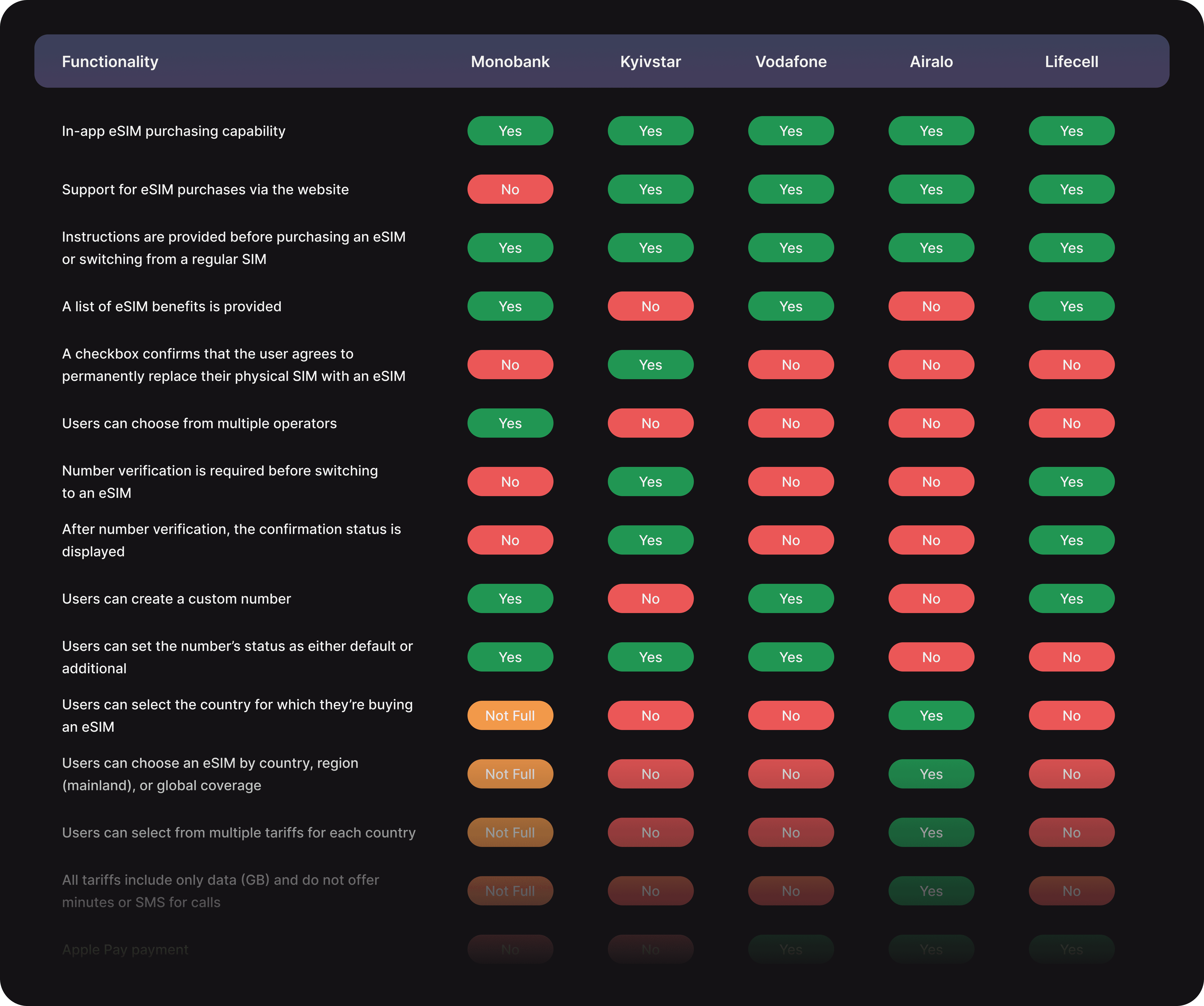
The research started by comparing Monobank, Kyivstar, Vodafone, Airalo, and Lifecell on purchase channels, onboarding information, number transfer, tariff selection, device setup, and payment options — to spot common patterns and gaps.
User survey
A 25-question survey with 108 respondents was run to understand eSIM adoption, awareness, and past experience. The headline finding: 58% of respondents don't currently use eSIM, and of those non-users, 39.7% said the reason was simply not knowing how it works.
User interviews
16 interviews were conducted — 11 with existing eSIM users, 5 with people who didn't use eSIM yet but were open to it — to understand the reasons behind the survey patterns and see how people actually used eSIMs day to day.
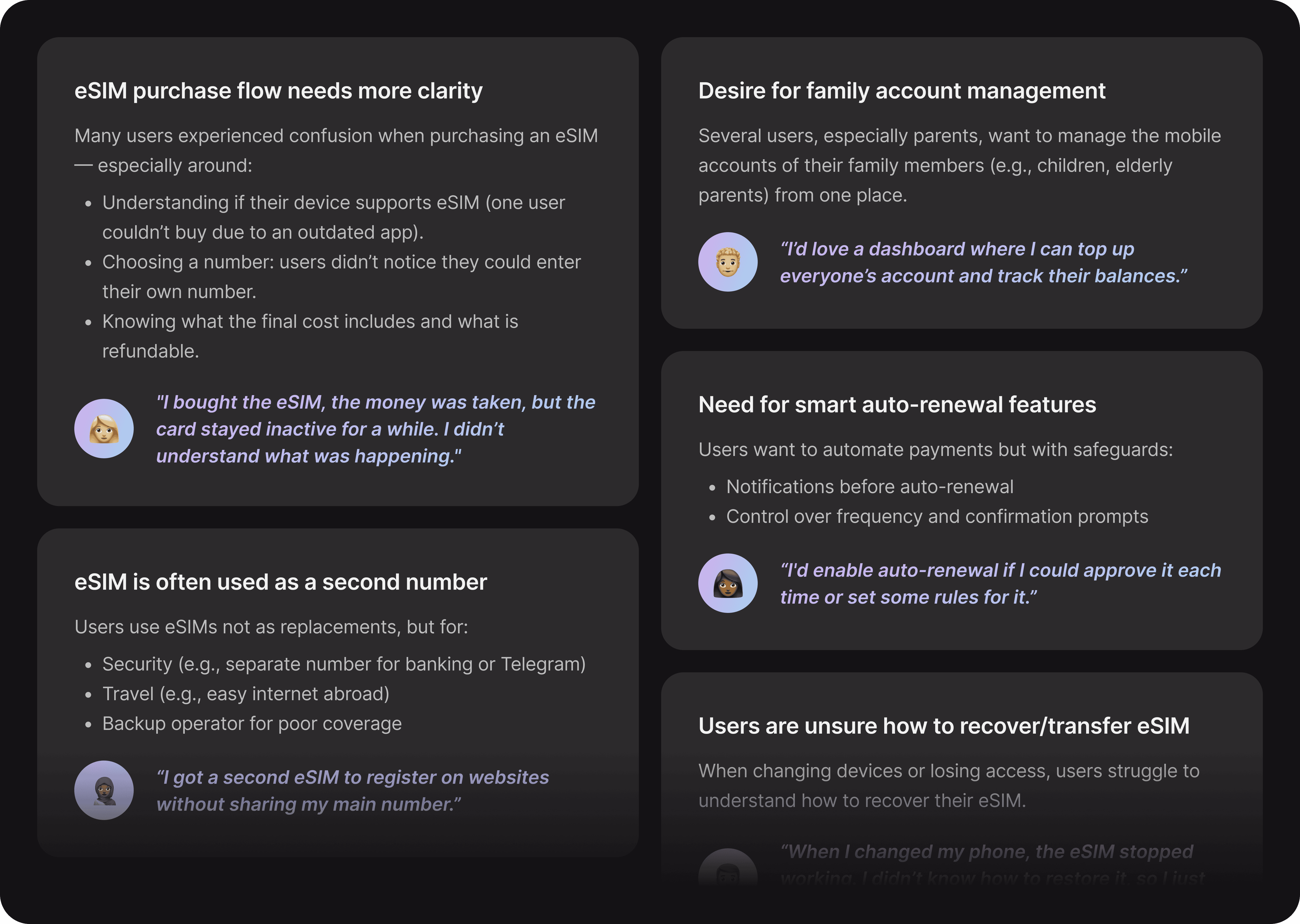
The interviews surfaced recurring friction around device compatibility, number selection, purchase cost, and eSIM recovery. They also surfaced needs that went beyond the purchase flow itself: people often treated eSIM as a second number for security, travel, or backup connectivity, wanted to manage family members' mobile accounts, and wanted more control over automatic payments.
Personas & customer journey maps
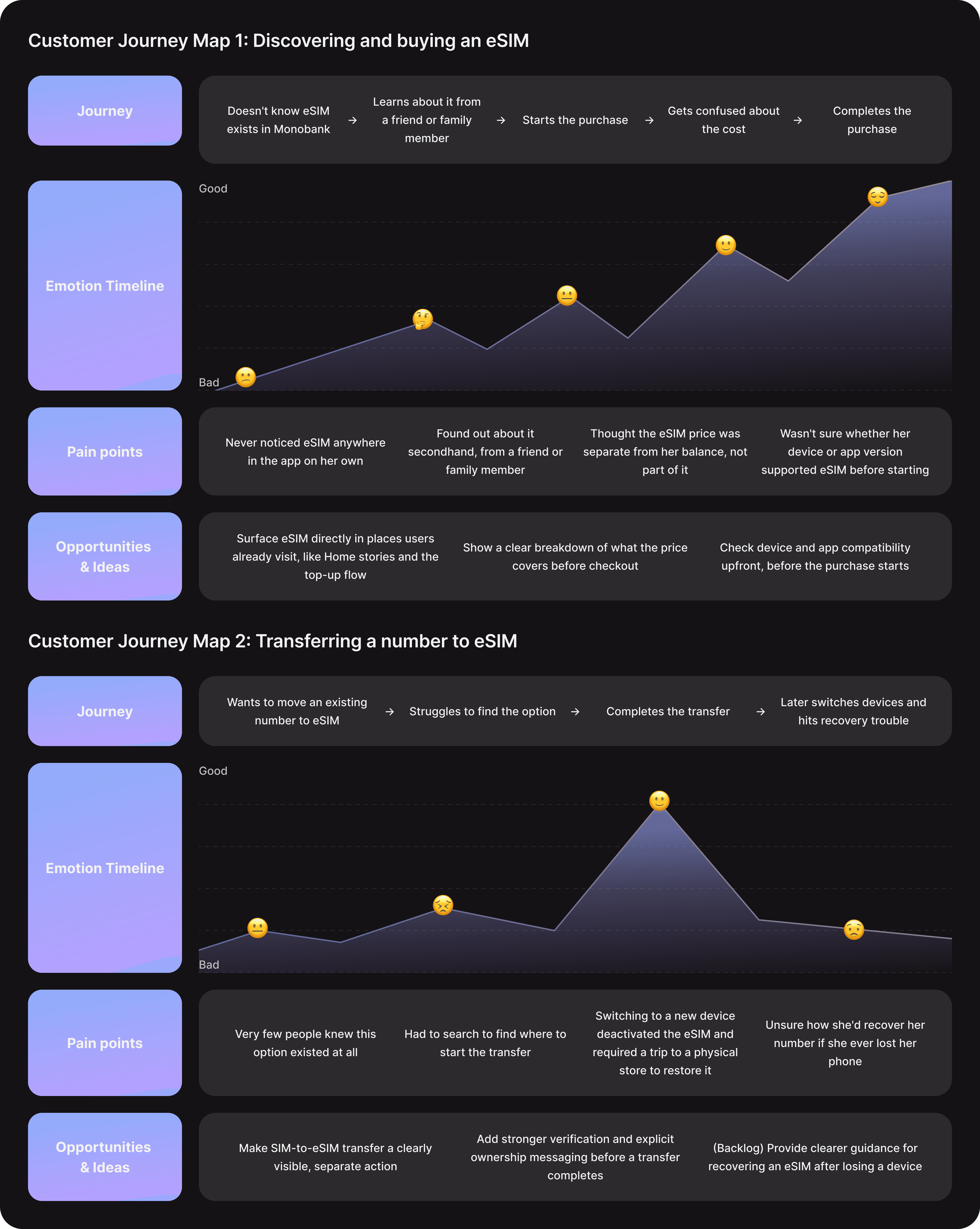
Research findings were synthesized into a core user persona and Customer Journey Maps, connecting individual usability issues to the bigger picture. The journeys highlighted recurring moments of uncertainty: losing connectivity, discovering eSIM as a fix, transferring an existing number, completing setup, and recovering access. They also pointed to opportunities for clearer education, guided setup, better transfer communication, and stronger confirmation states.

Defining the opportunities
Research findings were turned into "How Might We" questions to translate recurring problems into design opportunities — around eSIM discoverability, clearer purchase and transfer flows, more control over payments, and simpler ongoing management. These became the foundation for brainstorming solutions.
Problems & solutions
01 — Low awareness of eSIM
Most non-users didn't know eSIM was even available. 39.7% of non-users said it's because they don't understand how it works. Only 5.8% of actual users discovered it through the Monobank app itself — most heard about it elsewhere.
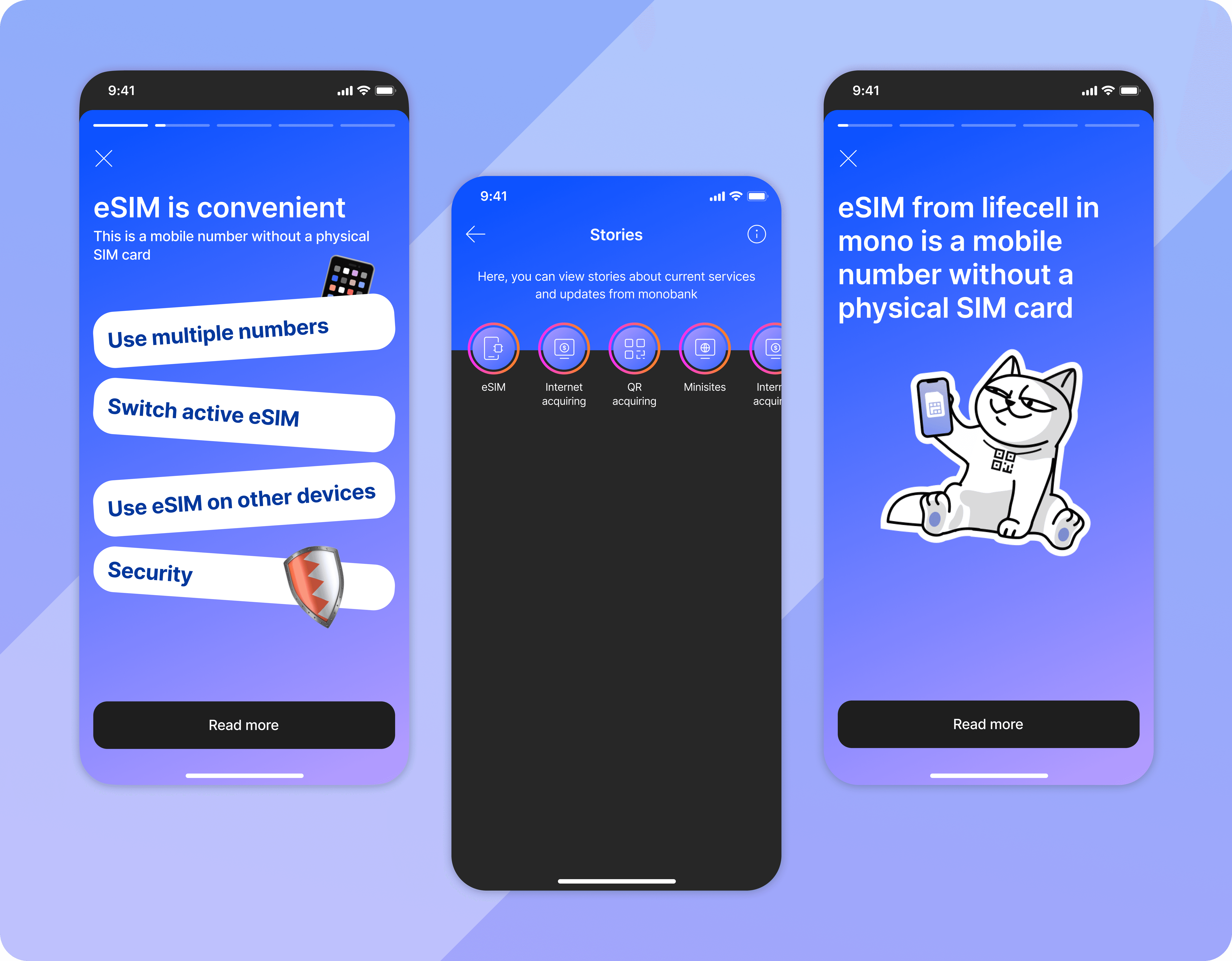
Solution: Bring eSIM stories back to the Home screen and Profile, and add one directly to the Other Payments top-up flow.
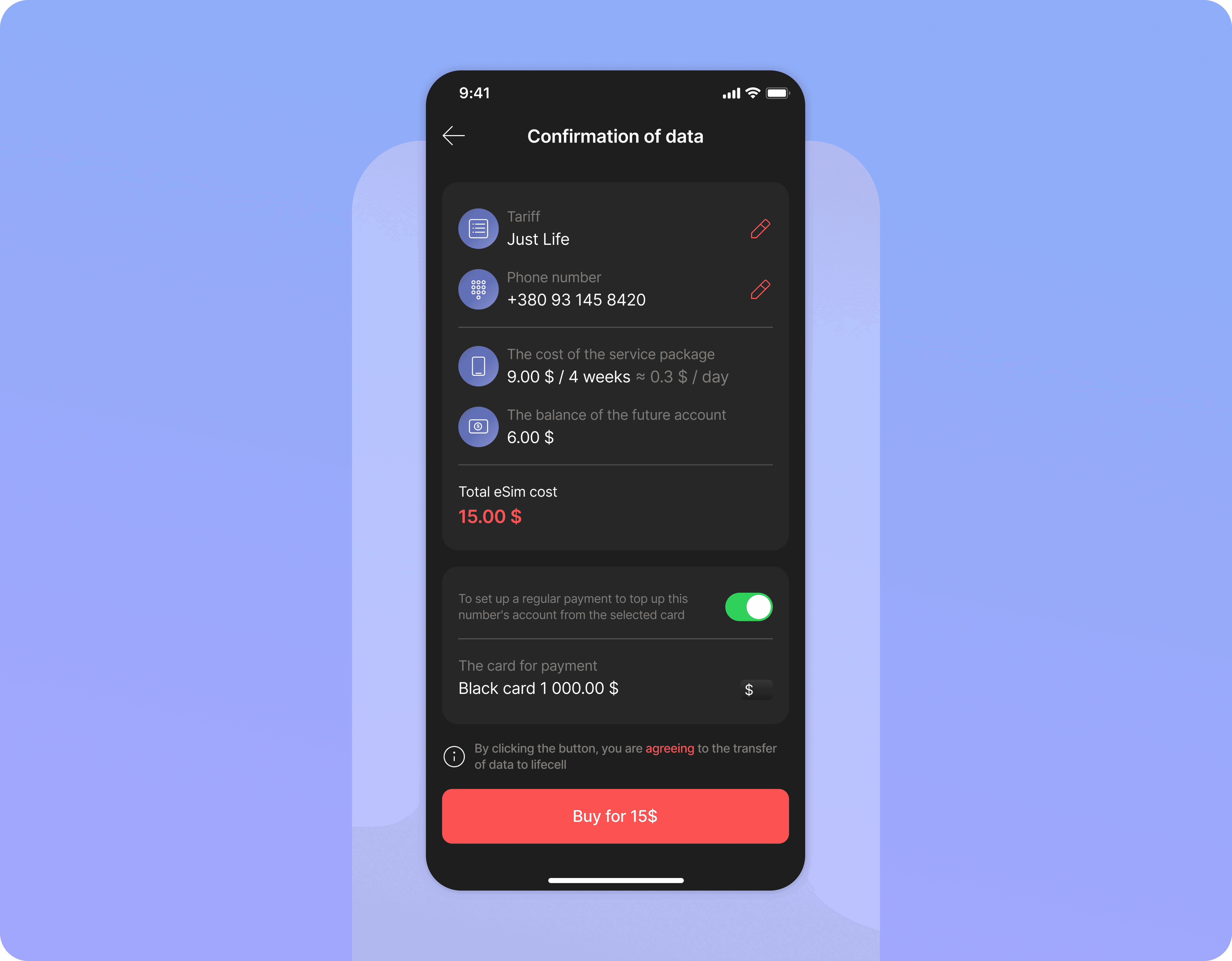
02 — Lack of clarity around eSIM costs
Checkout didn't explain that the price covers the first 4 weeks of service, with the rest becoming the eSIM's starting balance. One user topped up twice, thinking the two were unrelated. Before the fix, the purchase flow had a 0% task success rate and 6 errors per session.
Solution: Show the future balance, service cost, and total cost as separate, labeled line items at checkout.
03 — Unclear device compatibility
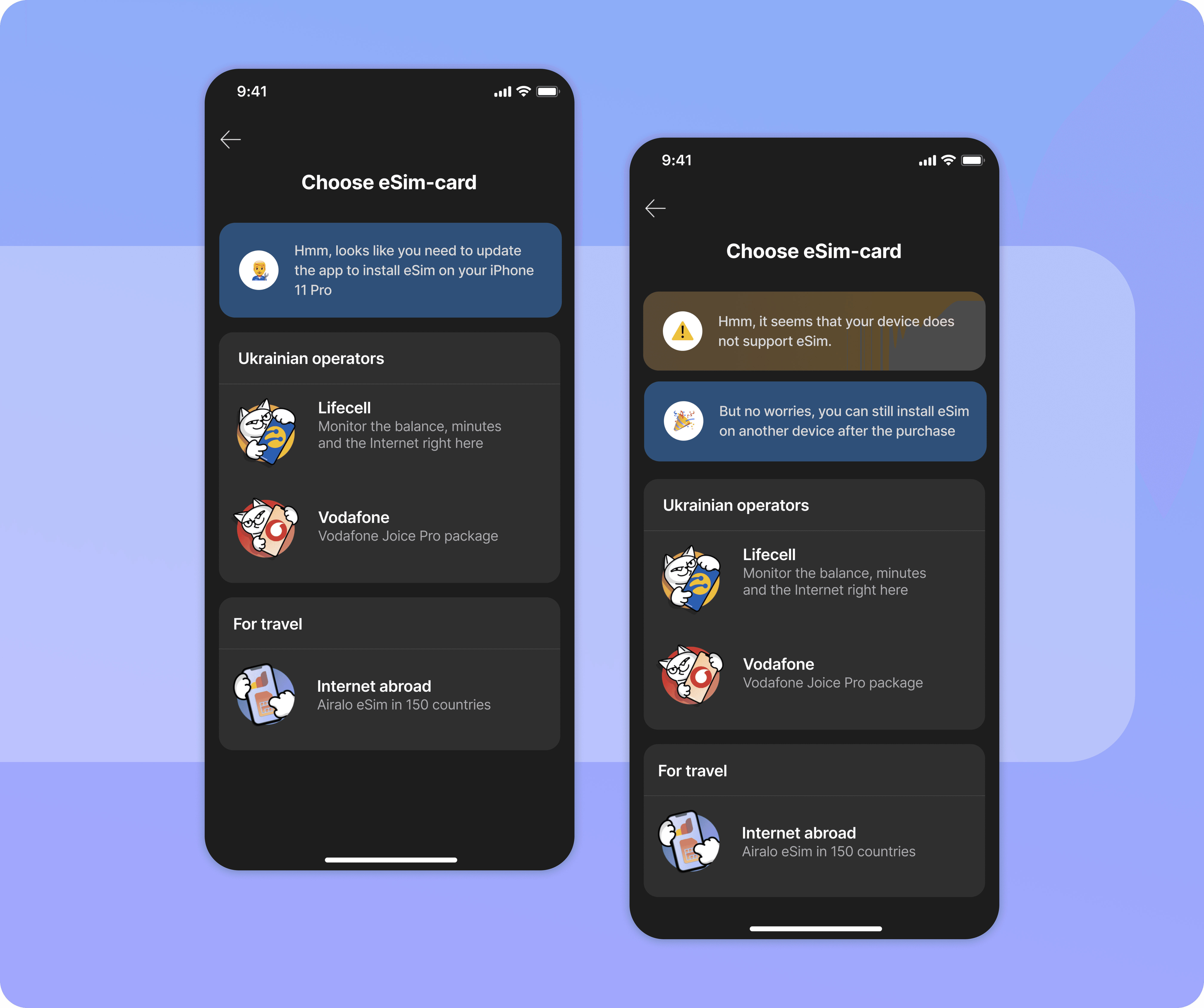
Users often didn't know if their device supported eSIM or if the app needed updating first. In testing, one participant hit a "device not supported" error that was actually just an outdated app.
Solution: Check device and app compatibility at the start of the purchase flow, before the user commits to anything.
04 — Lack of control over auto-renewal
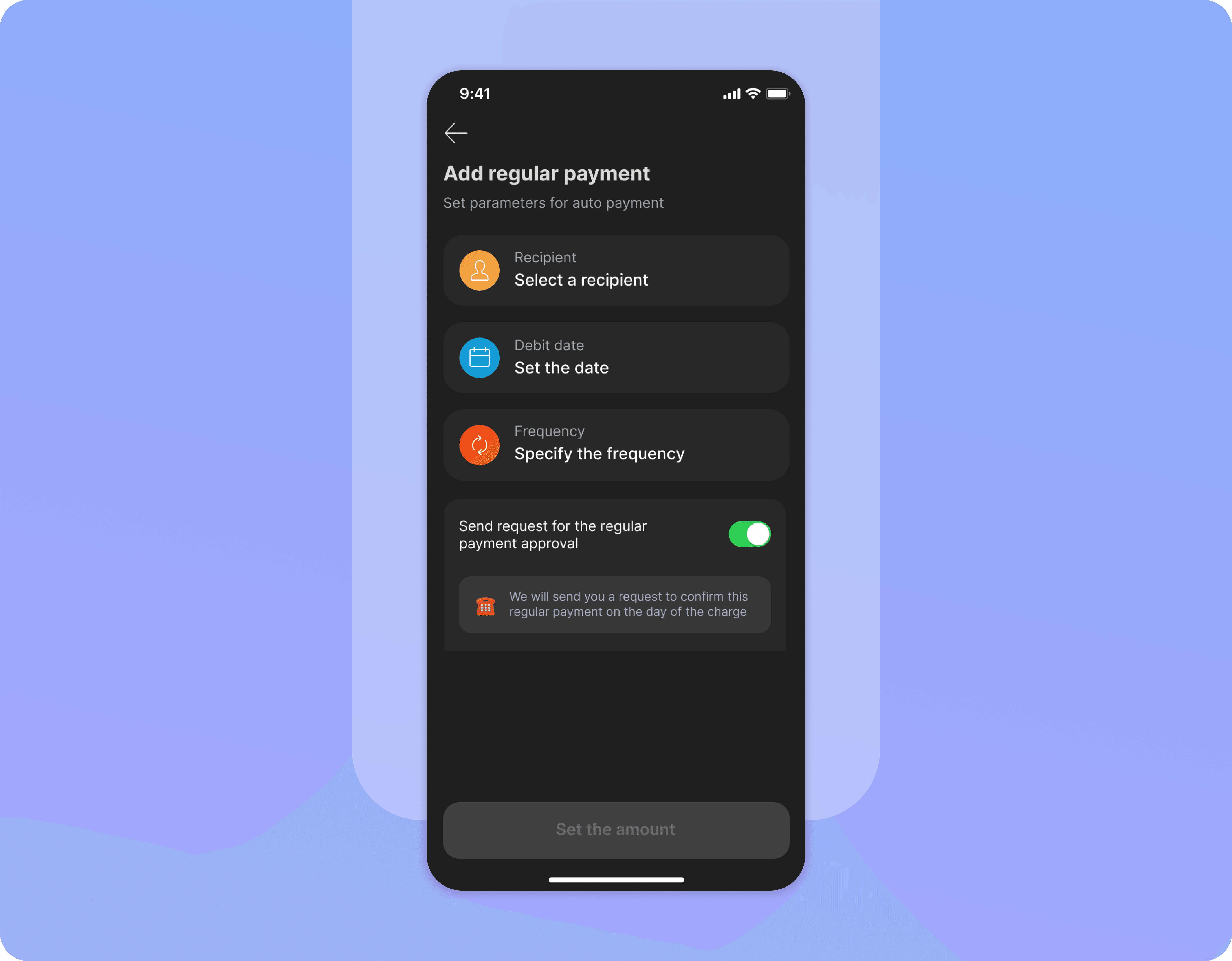
Users wanted more control over auto-renewal and often forgot to cancel it. 45% of interview participants raised this, and 80% of a small survey sample (5 people) agreed.
Solution: Added an optional confirmation step before each renewal payment.
05 — Limited functionality for managing additional numbers
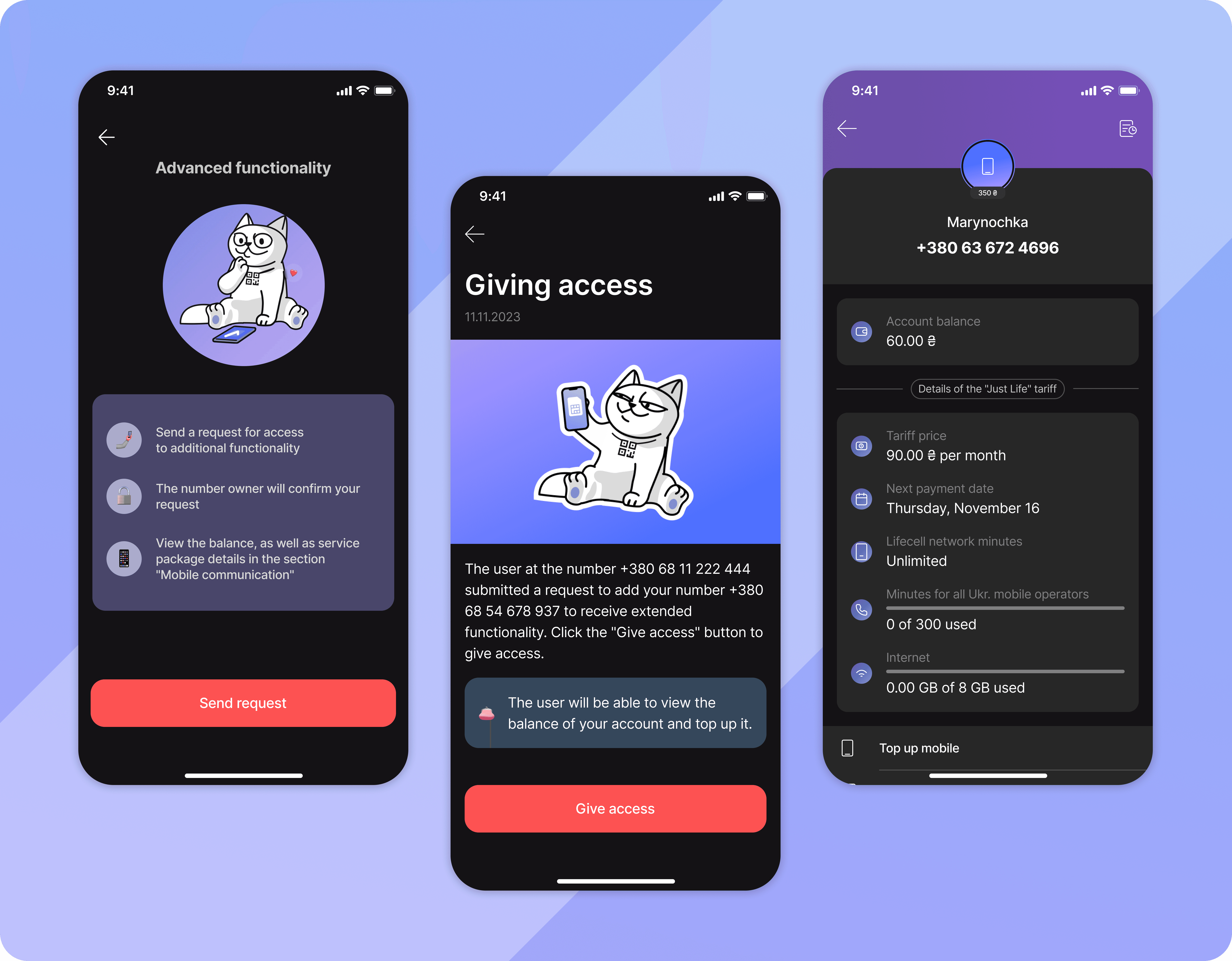
25.7% of users top up two numbers monthly, 8.6% top up three. Several wanted a way to manage family members' numbers too — one already tracks her father's and son's balances manually.
Solution: Let users add multiple numbers, request extended access to another person's account, and approve or decline those requests.
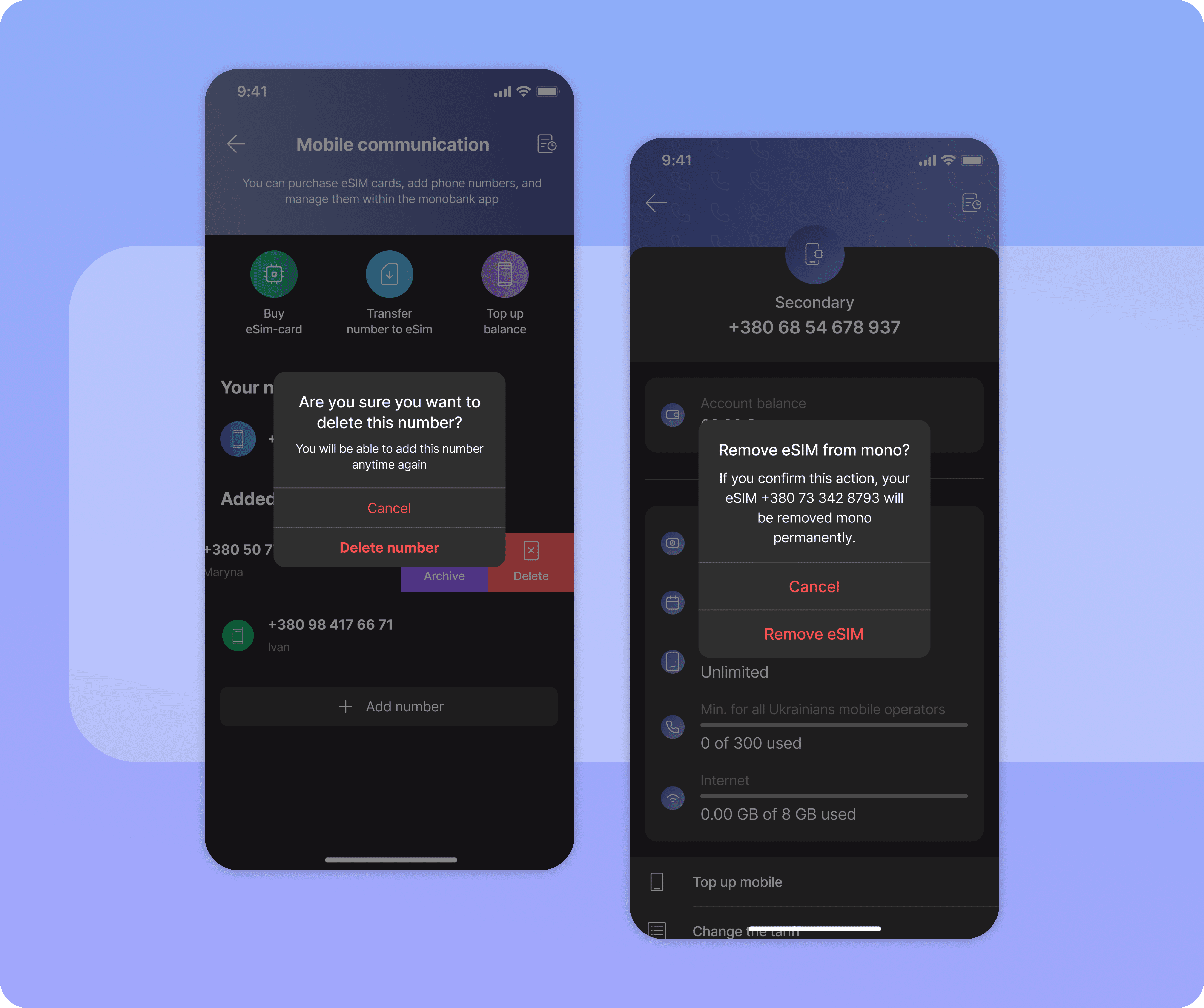
06 — No option to remove a number or eSIM
Users couldn't remove added numbers or delete their own eSIM. Not raised by users directly — it surfaced while auditing the existing flows, and it's a clear usability gap: no way to undo a mistake once a number is added.
Solution: Added the ability to remove numbers and permanently delete an eSIM.
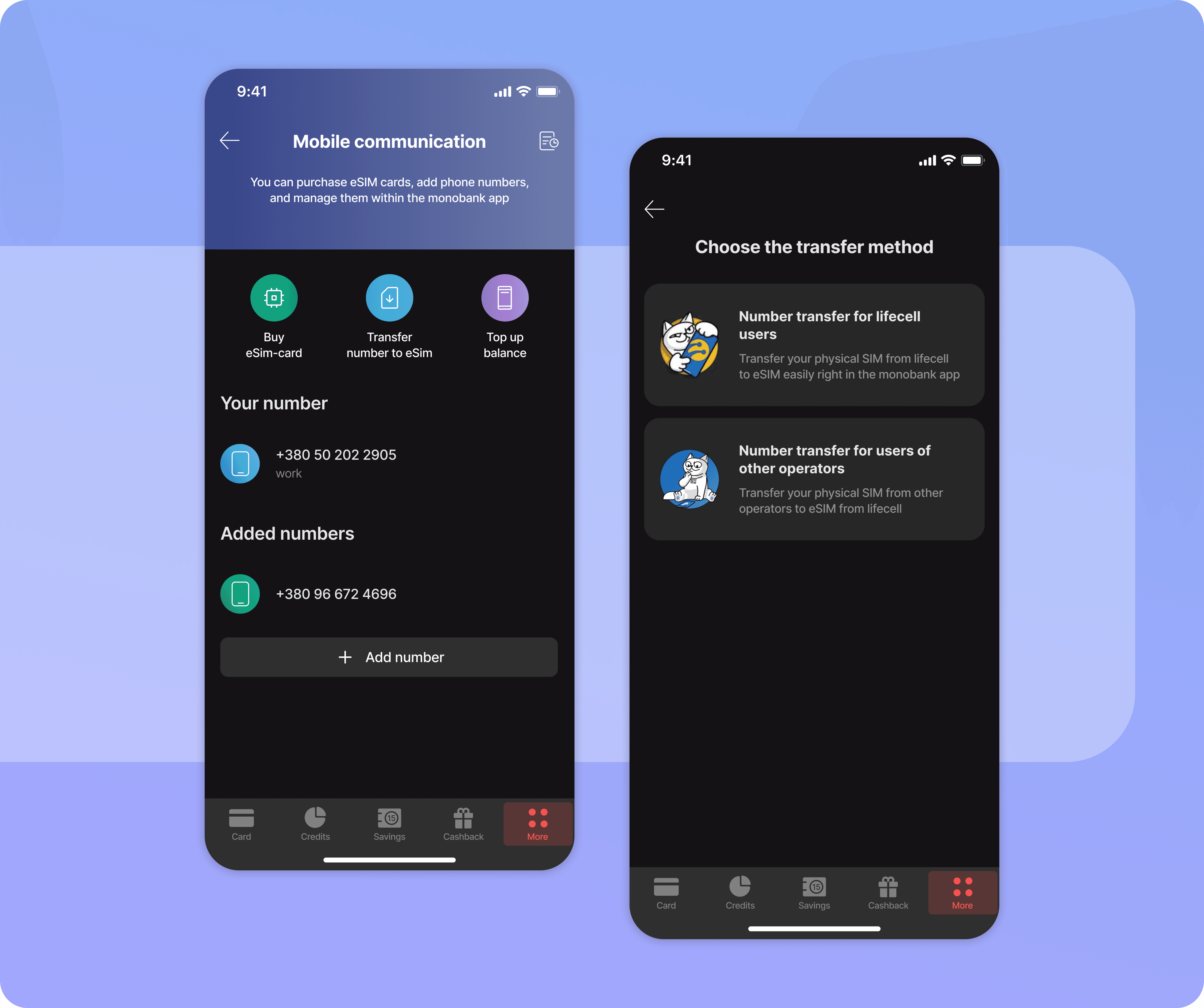
07 — Low awareness of SIM-to-eSIM transfer
Only 4% of survey respondents and 9% of interviewees knew this option existed. One user's eSIM deactivated after switching phones, requiring a trip to a physical store to restore it.
Solution: Made transfer a separate, visible action, and split the flow for Lifecell vs. other operators.
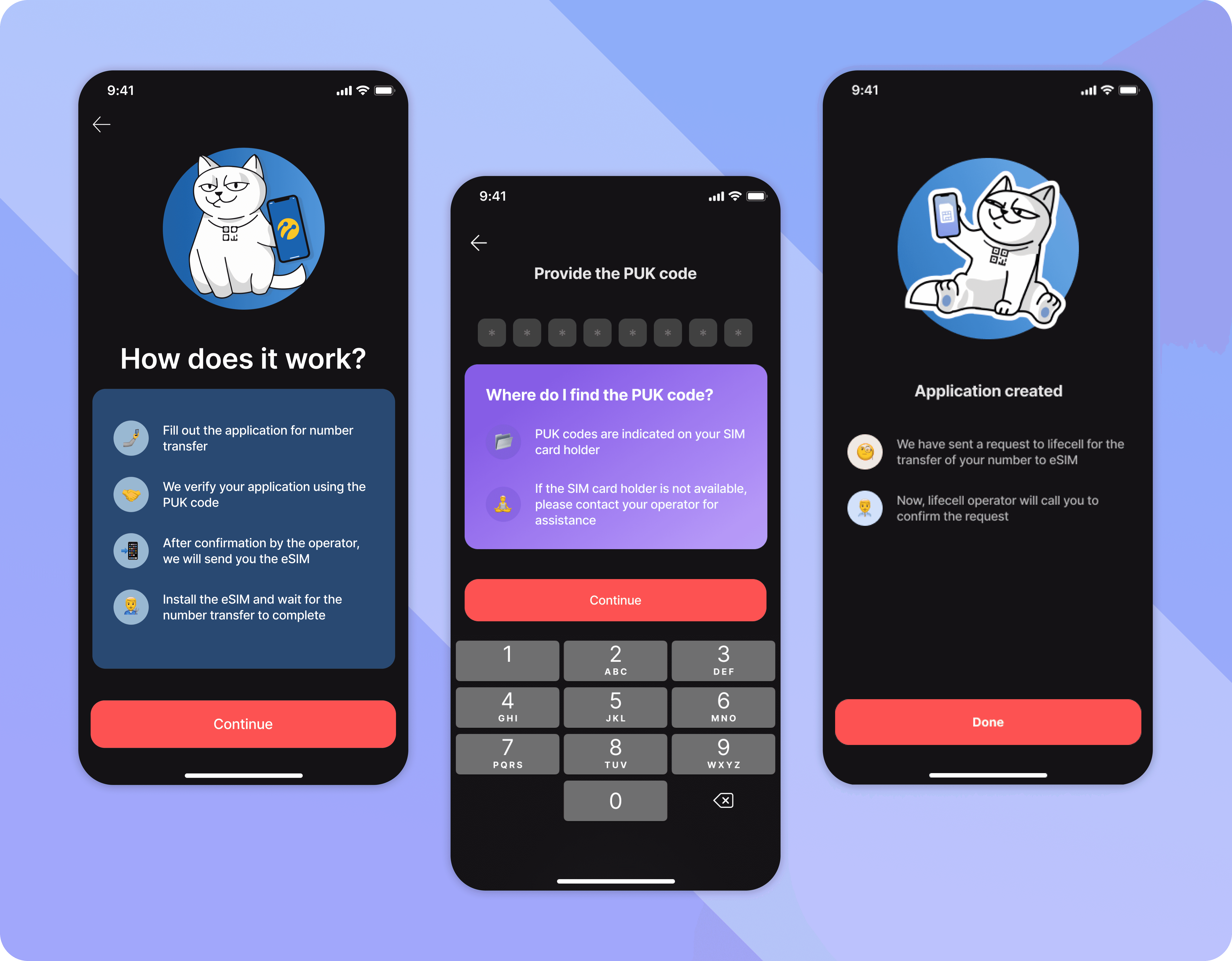
08 — Insufficient verification during number transfer
The most serious issue found — not raised by users, but surfaced while testing the flow directly. Anyone with someone else's number and brief phone access could transfer it to their own eSIM, since verification was just an SMS code and a call confirmation. Nothing told the person that transferring made them the new legal owner. The stakeholder called this out as the most important finding of the project.
Solution: Replace SMS/call verification with PUK-code verification, restrict transfers to numbers already on the user's device, and clearly state that completing a transfer makes the user the new owner.
Scoped out: eSIM recovery after device loss
Losing a phone with an active eSIM is just as painful to recover from as losing a physical SIM — 16% of interviewees had faced this. Left in the backlog since it depends on carrier-side changes outside Monobank's control. One quick idea proposed: include recovery details in the post-purchase email.
Usability Testing
After the solutions were built into interactive prototypes, usability testing checked for remaining issues and validated the redesign. Testing covered six core scenarios — eSIM discovery and purchase, number transfer, eSIM removal, and extended access management — measuring time on task, errors, misclicks, and task success.
Results
92–100% task success across 6 of 6 core flows
0 errors across 6 of 6 tested flows
100% task success for number transfer and extended access flows
Key improvements
The strongest improvement was seen in the eSIM purchase flow:
Task success: 0% → 92%
Errors: 6 → 0
Misclicks: 4 → 1
Number transfer flow — faster, with a 100% success rate maintained
Average time on task: 82 sec → 70 sec
Errors: 0
Task success: 100%
These two flows — purchase and transfer — were also the ones with the most friction going into the project, so the biggest gains landed exactly where they were needed most.